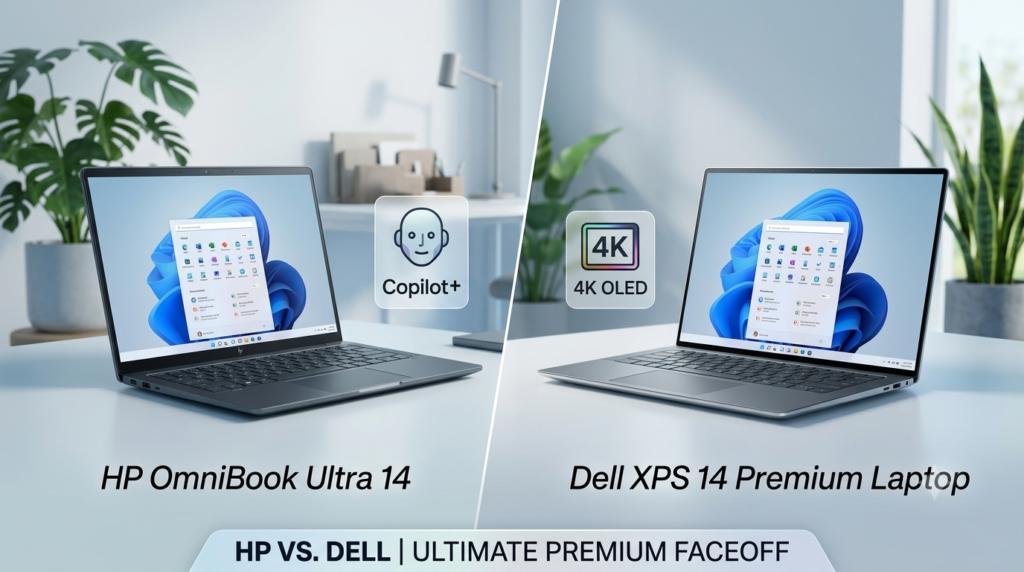
The premium laptop landscape has shifted entirely toward on-device artificial intelligence, sparking a major HP vs Dell XPS showdown. To find the Best Copilot+ PC, a machine can no longer rely on raw CPU speeds alone; it must feature a dedicated Neural Processing Unit (NPU) capable of delivering a minimum of 40 TOPS (Trillion Operations Per Second) to run advanced Windows AI features locally.
If you are looking to upgrade to a premium-tier AI laptop, two giants stand at the apex of design and performance: the newly evolved HP Spectre ecosystem (now anchored by the ultra-premium OmniBook AI tiers) and the iconic Dell XPS lineup. This deep-dive comparison breaks down their architectures, design choices, market popularity, and real-world performance to help you choose the best machine for your workflow.
⚡ HP vs Dell XPS: Technical Specifications Comparison
| Feature | HP OmniBook Ultra (14-Inch) | Dell XPS Series (14 & 16) |
| Processor Tiers | Up to Intel Core Ultra X9 388H | Up to Intel Core Ultra X9 388H |
| Max NPU Performance | Up to 50 TOPS (Intel AI Boost) | Up to 50 TOPS (Intel AI Boost) |
| Memory Options | 16GB to 64GB LPDDR5x (Onboard) | 16GB to 64GB LPDDR5x (Onboard) |
| Max Storage | Up to 2TB PCIe Gen 5 NVMe SSD | Up to 4TB PCIe NVMe SSD |
| Display Configuration | 14″ 3K (2880×1800) 120Hz OLED Touch | Up to 4K OLED / 2.8K InfinityEdge 120Hz Touch |
| Chassis Materials | Durable Forged Aluminum | CNC-Machined Aluminum & Gorilla Glass Victus |
| Wireless Tech | Intel Wi-Fi 7 + Bluetooth 6.0 | Intel Killer Wi-Fi 7 + Bluetooth 5.4 |
| Camera Quality | 9MP IR Camera with privacy shutter | 8MP Sensor with 4K resolution capabilities |
📋 Brand Ecosystem Breakdown: HP vs Dell XPS
To understand where the HP Spectre (OmniBook) and Dell XPS fit into the broader consumer market, here is the complete classification of both brand lineups by target user, real-world entry pricing, and key features:
| Brand / Series | Target User | Entry Price (USD) | Key Features |
| HP Pavilion | Students, families | $500 – $1,000 | Everyday value, 2-in-1 hybrid chassis options, solid build. |
| HP Envy | Power users, creators | $900 – $1,500 | Premium aluminum design, vivid OLED options, strong multi-core performance. |
| HP OmniBook (Spectre Upgrade) | Creators, premium pros | $1,699+ | Copilot+ Flagship Tier, 3K variable refresh OLEDs, up to 50+ TOPS NPU. |
| HP EliteBook | Business, enterprise | $1,699+ | Advanced hardware security enclaves, MIL-STD durability, long battery lifespans. |
| Dell (Inspiron) | Entry-level, casual use | $399 – $699 | Practical metal designs, balanced displays, robust everyday battery life. |
| Dell Plus Series | Mainstream users | $799 – $1,099 | Mid-range price point, sharp 2.5K screen configurations, sturdy all-metal deck layout. |
| Dell Premium (XPS) | Creators, power pros | $699 – $3,400+ | Copilot+ Flagship Tier, stunning InfinityEdge displays, CNC aluminum, haptic deck. |
| Dell Pro (Latitude) | Enterprise business | $449 – $1,819+ | Strict IT enterprise security compliance, robust build quality, deep lifecycle endurance. |
| Dell Pro Max (Precision) | Workstation engineers | $1,279 – $4,079+ | Workstation-grade processing blocks, error-correcting ECC RAM, fully upgradeable components. |
📊 Premium AI Market Trends
When looking at customer adoption and purchasing preferences in this specific luxury AI device refresh cycle, the distribution between the two market giants splits clearly based on use cases:
- Dell XPS Series: Dell maintains a dominant presence in the ultra-premium tier. Its established brand equity, corporate executive deployments, and cutting-edge minimalist aesthetic make it a default status-symbol upgrade for professional creators and design-focused power users.
- HP Premium OmniBook / Spectre: HP holds a massively growing trajectory in the consumer market. By pricing its hardware configurations aggressively relative to the hardware spec levels and delivering exceptional battery lifecycle optimizations, HP has captured a significant portion of mainstream power users, students, and hybrid remote workers.
🎨 Design, Chassis, and User Experience
The HP vs Dell XPS Keyboard and Interface Fight
- HP OmniBook: Retains a more traditional layout focusing heavily on real-world comfort. In this HP vs Dell XPS matchup, it features a full-size backlit typing deck and a highly responsive haptic precision touchpad that feels instantly natural.
- Dell XPS: Embraces a radical, ultra-minimalist design aesthetic. The keyboard utilizes a continuous, gapless “zero-lattice” key layout alongside a seamless glass haptic touchpad hidden completely within the hand rest area. It is a striking design but comes with a brief learning curve.
Ports and Physical I/O
- HP OmniBook Ultra: Incorporates three Thunderbolt 4 ports with USB Type-C 40Gbps signaling rate and a standard headphone/microphone combo jack.
- Dell XPS: Relies strictly on Thunderbolt 4 (USB Type-C) ports with structural DisplayPort output capability and a headphone jack. Dell excludes standard USB-A across the board, requiring users to fully adopt modern Type-C hubs and dongles.
🔋 Battery Life and Daily Portability
- Chassis Thinness: HP pushes portability thresholds down to a razor-thin profile, matching Dell’s tight 0.5-inch (12.7 mm) aluminum design framework on the highly compact XPS 13.
- Total Endurance: HP configurations offer deep multi-day battery efficiencies for continuous local playback. Dell’s dual-fan cooling optimizations allow for up to 17 hours of battery life on its compact displays, jumping all the way up to 27–31 hours of streaming runtime on specific configurations with a 2K display layout.
- Fast Charging Stand-Off: Both brands support high-efficiency express charging capabilities, enabling a dead battery to recover back up to a 50% charge in roughly 45 minutes using compact Type-C power bricks.
🥊 Head-to-Head: Which Should You Buy?
Choose the HP OmniBook Ultra If:
- You prioritize a traditional, incredibly satisfying physical typing layout with clear key separation.
- You want high-end 50+ TOPS local AI compute capabilities straight from an integrated setup.
- You prefer quad speakers calibrated with Poly Studio tech paired with sharp 5MP webcams.
Choose the Dell XPS If:
- You want the most striking, futuristic laptop design on the market with a seamless haptic glass deck.
- You want stunning Tandem OLED InfinityEdge screen choices that deliver industry-leading brightness and deep black contrast levels.
- You need up to 64GB of RAM allocation paired with dedicated NVIDIA RTX graphics options for heavy software workloads.
🏁 Final Verdict
Both the HP premium AI lineup and the Dell XPS series represent the absolute pinnacle of the Best Copilot+ PC 2026 class. Deciding on a clear winner in this HP vs Dell XPS showdown ultimately comes down to your specific daily workflow priorities.
If your workflow demands an ultra-futuristic screen experience and premium metal engineering, the Dell XPS takes the crown. If you want a balanced, reliable powerhouse with flexible architecture options and a stellar keyboard, the HP OmniBook platform remains an unmatched tool. Whichever side you land on in the HP vs Dell XPS debate, both manufacturers have successfully delivered true flagship performance for professionals and creators alike.